
Czy wiesz, że… ?
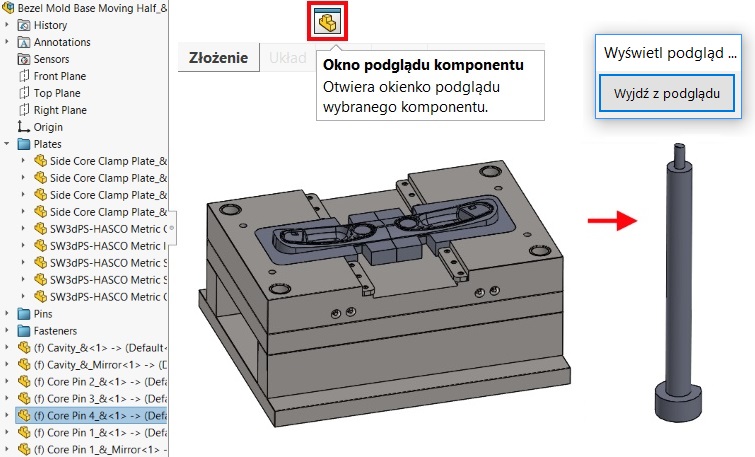
W złożeniu możesz łatwo ustalić, co się kryje pod nazwą danego komponentu jeżeli nie jest on wprost widoczny w obszarze graficznym. Wystarczy zaznaczyć pozycję w drzewie i wybrać Okno podglądu komponentu.
07/08/2018
Czy wiesz, że… ?
W złożeniu możesz łatwo ustalić, co się kryje pod nazwą danego komponentu jeżeli nie jest on wprost widoczny w obszarze graficznym. Wystarczy zaznaczyć pozycję w drzewie i wybrać Okno podglądu komponentu.




Hello Pawel,
Hopefully you can help me with the next problem, If I want to use the „component preview window” in order to isolate a component, the component does not isolated at all, I mean the assembly continuos to appears around the component I selected, what can be the solution?
Regards
Zain C
Can you send me a screenshot please?
Same issue i am also facing as Zain, if we select a part from an assembly tree then click on component preview window the part doesn’t isolate in the split window that appears, we still see the complete assembly instead of selected part.
I cannot help you, cause could be many reasons, i.e.: service pack, lightweight mode, files (parts) not converted to current version etc.