


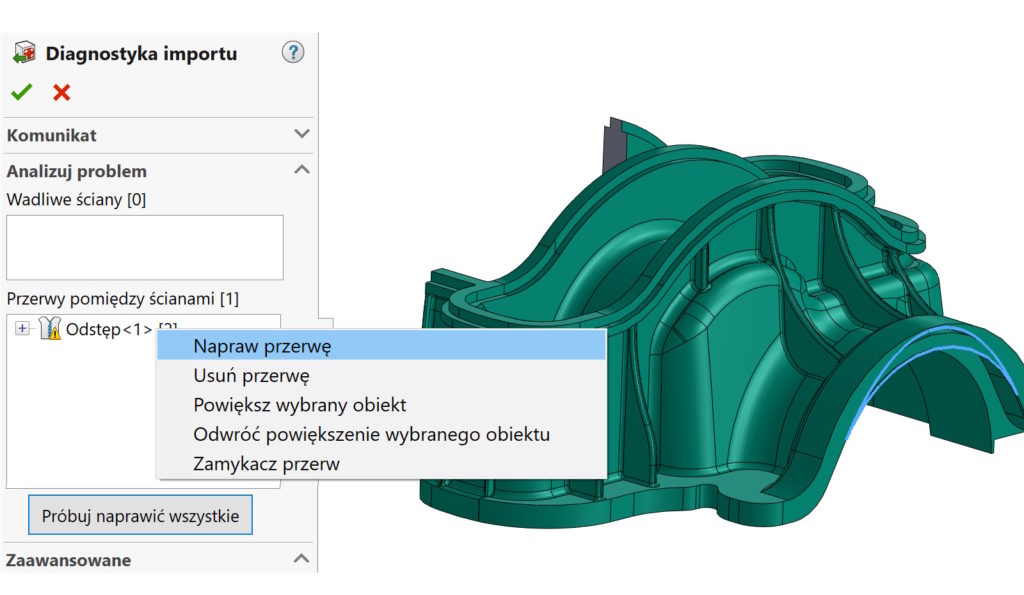
By opening files imported from systems other than Solidworks, errors may appear. The amount and type of errors depends on a number of factors.
On the example of the model, I will show you a break, how the machine works and what effect you get by manually repairing the problem.
Repair break You will find in the window import diagnostics after right -clicking on Space.


The command was fixed by the error, but the quality of the resulting surface is far imperfect.


And now another method.
After opening the unsaved file, I choose Filling the surface by selecting all the edges of the hole. The selection of the type of equalization does not matter, because the wall is flat.


After combining the results, the perfect block comes out.
Application.
Automatic tools are not always better!


——————————————————————————————————————————————-
You want:
- learn all surface and hybrid modeling operations,
- use the surface as auxiliary tools,
- efficiently repair errors in imported files,
- model really complicated shapes,
- create models from A to Z based on conceptual sketches, pictures of other input data?
All this is discussed during a two -day training 1 – 2 July with Surface modeling >>> I invite you to.


Last 2 miejsca – zapraszam!
ps. For those really interested rabat.
Contact: szkolenia@cadvantage.pl or 608 086 942.